
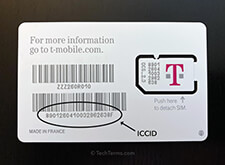
The Integrated Circuit Card Identifier, or ICCID, is a unique serial number that identifies each SIM card internationally. It’s essentially the SIM card’s fingerprint, distinguishing it from all others. Understanding where to find this identifier on your SIM card and how it’s structured is crucial for various tasks, from activating your service to troubleshooting network issues. This article delves into the anatomy of the ICCID, its physical representation, and how it appears on different SIM card types.
The ICCID isn’t just a random string of numbers. It adheres to a defined structure, ensuring global standardization and facilitating seamless communication between mobile networks. Typically, an ICCID is composed of 19 or 20 digits, although shorter versions may occasionally exist, especially on older SIM cards. Each section of the ICCID provides specific information about the card’s origin and purpose. Expect to see the following components:
- Issuer Identification Number (IIN): This is the first part of the ICCID and usually comprises the first six digits. It is standardized by the International Telecommunication Union (ITU). Specifically, the first two digits of the IIN conform to the ISO 7812 numbering system. This initial pair, known as the Major Industry Identifier (MII), signifies the industry responsible for the card’s issuance. For SIM cards, the MII is almost invariably ’89’, denoting telecommunications services.
- Mobile Network Code (MNC): Following the MII is the Mobile Network Code. This code identifies the specific mobile network operator (MNO) that issued the SIM card. The MNC is crucial for routing calls and data to the correct network.
- Individual Account Identification: This section is unique to each SIM card issued by the MNO. Think of it as the serial number assigned by the carrier to your specific SIM.
- Check Digit: The final digit is a check digit calculated using the Luhn algorithm. This digit ensures the validity of the ICCID. This check prevents errors when the ICCID is manually entered or scanned.
Now, let’s explore where you can physically locate the ICCID on your SIM card. The position can vary based on the type of SIM card you have – standard, micro, or nano. The ICCID is generally printed on the back of the SIM card itself. The text is often very small, so magnification might be helpful. Be careful when handling the SIM card to avoid damage.
Standard SIM Cards: These are the largest type of SIM card and are now rarely used. If you happen to have one, the ICCID is usually printed clearly on the back. You should have no difficulty locating it with the naked eye, though good lighting always helps.
Micro SIM Cards: Smaller than standard SIMs, micro SIMs are still sometimes used in older devices. The ICCID is printed on the back, but the smaller surface area means the text can be quite diminutive. A magnifying glass is recommended.
Nano SIM Cards: The smallest SIM card format, nano SIMs are prevalent in modern smartphones. Due to their minuscule size, the ICCID printing is incredibly small. Often, individuals find it difficult to read the code without significant magnification. Furthermore, due to the limited space, the ICCID on a nano SIM can sometimes be less prominent than on larger SIMs.
Beyond the physical SIM card itself, you can often find the ICCID stored within your mobile device’s settings. The exact location varies depending on your operating system (iOS or Android) and the device manufacturer. Here’s a general guide:
For iOS (iPhone/iPad):
- Go to Settings.
- Tap General.
- Tap About.
- Scroll down to find the ICCID. It’s typically listed under “SIM”.
For Android:
- Go to Settings.
- Tap About Phone (or System).
- Tap Status (or SIM Status).
- Look for the ICCID. The exact label might differ slightly depending on your device.
Accessing the ICCID through your device’s settings is often the most convenient method. This digital display eliminates the need for a magnifying glass and reduces the risk of damaging the physical SIM card during handling. It is important to note, however, that this method relies on the device correctly reading the SIM card. If the SIM card is damaged, or not properly inserted, this method may not work.
Knowing your ICCID is beneficial in several scenarios. When contacting your mobile carrier for support, they might request your ICCID to verify your account. This is particularly relevant when reporting a lost or stolen SIM card, activating a new phone, or troubleshooting service issues. The ICCID acts as a secure identifier, ensuring that the support team is assisting the correct account.
Furthermore, when switching carriers or unlocking your phone, you may need your ICCID. Some carriers require the ICCID to process the porting of your phone number. The ICCID is a key piece of information for ensuring a smooth transition between providers.
In conclusion, the ICCID is a vital identifier associated with your SIM card. It’s composed of a structured set of digits encoding information about the card’s issuer, network, and unique serial number. You can find it printed on the physical SIM card, often in very small text, or within your phone’s settings. Keeping a record of your ICCID can prove invaluable when you need to contact your mobile carrier or manage your mobile account. Knowing what it looks like and how to locate it can save you time and frustration in various situations.






Leave a Comment